 Marukit
Guide
How to Download TikTok Audio as MP3 (iPhone, Android, PC)
Found a TikTok sound you want to keep? Here's how to save just the audio, the song, sound or voice-over, as an MP3 from the video's link, plus how to get the audio from a video that's already on your phone.
Updated · 4 min read
Why save a TikTok sound as MP3?
In TikTok you can add a sound to your Favorites, but you can't take it out of the app as a file. An MP3 is just the audio, so it plays in any music or files app, works offline, and is much smaller than the video.
- Your own TikToks: keep a copy of a voice-over or song you recorded.
- Listening later: a talk, a recipe, a language lesson or a song, without keeping the video.
- Audio only: when you don't need the picture, the MP3 saves space on your phone.
Music in TikToks is often licensed only for use on TikTok, so keep downloaded songs for personal listening. Only save sounds you made or have permission to use, and credit the creator if you share them.
Step 1: Copy the TikTok link
- Open the video in the TikTok app.
- Tap the Share arrow, then Copy link. Short vm.tiktok.com links work fine.
- On a computer, open the video on tiktok.com and copy the address from the address bar.
Step 2: Paste it into TikTok to MP3
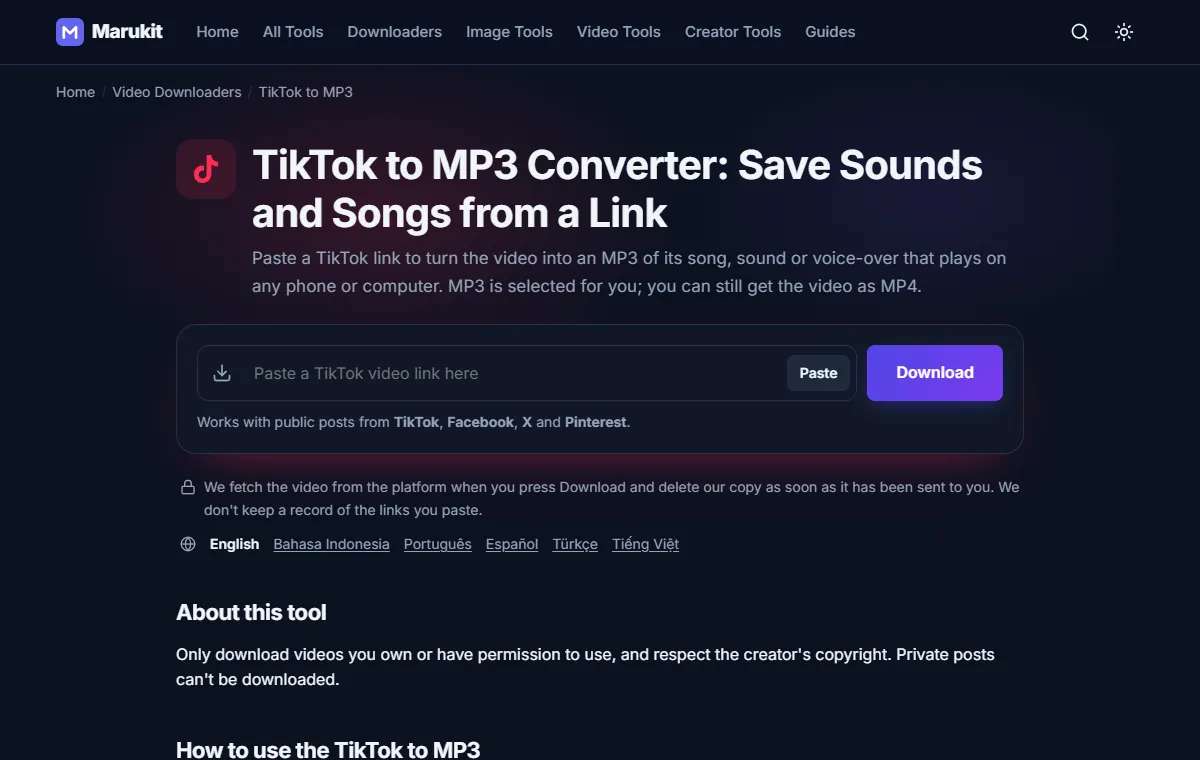
- Open TikTok to MP3. There's no app to install and no account needed.
- Tap Paste. If your browser asks to read the clipboard, allow it. Or tap the box and paste the link yourself; it starts automatically.
- Wait a few seconds while it says Fetching video.... You'll then see the caption, the creator and the length.
Step 3: Tap MP3 (audio only)
On this page MP3 (audio only) is first in the list. Tap it and you'll see Converting to MP3..., which can take up to a minute. When Download started! appears, the MP3 is on its way to your device. It's a 192 kbps file named after the TikTok caption, so it's easy to spot.
Want the video as well? The same list has MP4 (best quality). See how to download TikTok videos without watermark for the full video steps.
Where the MP3 goes on each device
- iPhone: Safari saves it in the Files app under Downloads. Tap it to play, or tap Share to send it to another app. Photos only holds pictures and videos (that's where Save Video puts an MP4), so an MP3 stays in Files.
- Android: open the Files or Downloads app. Most music players also find new MP3s in Downloads.
- Windows or Mac: it's in your Downloads folder.
Already have the video? Convert it to MP3
If the video is already on your phone or computer, for example a TikTok you recorded yourself, you don't need a link. Video to MP3 takes the sound out of the file.
- Open Video to MP3 and tap choose a file. MP4, MOV, WebM, MKV, AVI and M4V work, up to 95 MB and 20 minutes.
- Pick the MP3 quality: 192 kbps (recommended) for most things, 128 kbps (speech) for talking, 320 kbps (music) for songs.
- Press Extract MP3. You'll see the upload, then Extracting audio... with a percentage.
- Play the preview to check it, then tap Download.
This tool uploads the video to our server to do the work. The upload is deleted as soon as the MP3 is ready, and the MP3 30 minutes later. A higher bitrate makes a bigger file but can't sound better than the video's own audio.
Using a TikTok sound as a ringtone
- Android: open Settings › Sound (on some phones Sounds and vibration) › Ringtone and pick the MP3 from your files. Menu names differ a little between phones.
- iPhone (iOS 26 or later): open the MP3 in Files, tap Share › Use as Ringtone. iPhone ringtones are up to 30 seconds long, so a short sound works best.
- Older iPhones: you can't set an MP3 as a ringtone directly. It takes a few steps in Apple's free GarageBand app.
If the TikTok audio won't download
- "This post is private or needs a login, so it can't be downloaded." Private and friends-only videos can't be saved, as video or as MP3.
- "Video not found. It may have been deleted. Check the link." The video was removed, or the link got cut off when you copied it. Copy it again.
- The link is to a profile, not a single video. Open the video itself and copy its link.
- The MP3 is silent. TikTok sometimes mutes a sound for copyright reasons, and the MP3 is the same audio, so it's silent too.
- It's a photo slideshow, not a video. Slideshows aren't supported yet.
- "Couldn't fetch this video right now. Please try again in a moment." TikTok is slow or blocking requests for a moment. Wait a minute and try again.
- "This video has no audio track, so there's nothing to convert to MP3." (Video to MP3) The file has no sound in it to save.
- The file is too big (Video to MP3). The limit is 95 MB. Trim the video on your phone, or shrink it first with Video Compressor, then try again.
Frequently asked questions
How long does it take?
Finding the video takes a few seconds, and making the MP3 can take up to a minute.
Can I save a TikTok sound from someone else's video?
Only if it's a public video, and only for personal listening unless you have the rights. Private videos and muted sounds can't be saved.
Do I need the TikTok app or an account?
No. You only need the video's link. On a computer you can copy it from tiktok.com, and Marukit never asks you to log in.
Tools in this guide
More guides
- How to Download TikTok Videos Without Watermark
- How to Download Facebook Videos (iPhone, Android, PC)
- How to Download Twitter (X) Videos on iPhone, Android and PC
- How to Download Pinterest Videos to Your Phone or PC
- How to Compress an Image to 100KB Without Losing Too Much Quality
- How to Compress a Video for WhatsApp
- HEIC vs JPG: Which Should You Use, and How to Convert
- Best Video Sizes for Social Media (TikTok, Reels, Shorts and More)
- How to Convert MOV to MP4 (Windows, Mac and iPhone)
- How to Convert PNG to WebP for a Faster Website
- How to Reduce Video Size on Your Phone (iPhone and Android)
- How to Make Your Photo Fit as a WhatsApp DP
- How to Download a YouTube Thumbnail in HD (iPhone, Android, PC)