 Marukit
Guide
How to Download a YouTube Thumbnail in HD (iPhone, Android, PC)
The thumbnail is the picture people see before they click a video. Here's how to get it from a public YouTube video, Short or live stream as a JPG, in HD when YouTube has it, using just the video link.
Updated · 3 min read
Why save a YouTube thumbnail?
- Checking your own thumbnail: see exactly the image YouTube shows viewers, in every size.
- Getting back a lost file: keep a copy of a thumbnail you designed when the original is gone.
- Reference: show a video in a blog post, presentation or school project.
Thumbnails belong to the channel that made them. Save your own freely, but ask before reusing someone else's, and credit the creator.
Step 1: Copy the video's link
- Open the video or Short in the YouTube app.
- Tap Share, then Copy link.
- On a computer, copy the address from the address bar instead.
Links like youtu.be/…, youtube.com/watch?v=…, youtube.com/shorts/… and youtube.com/live/… all work.
Step 2: Get the thumbnail from the video link
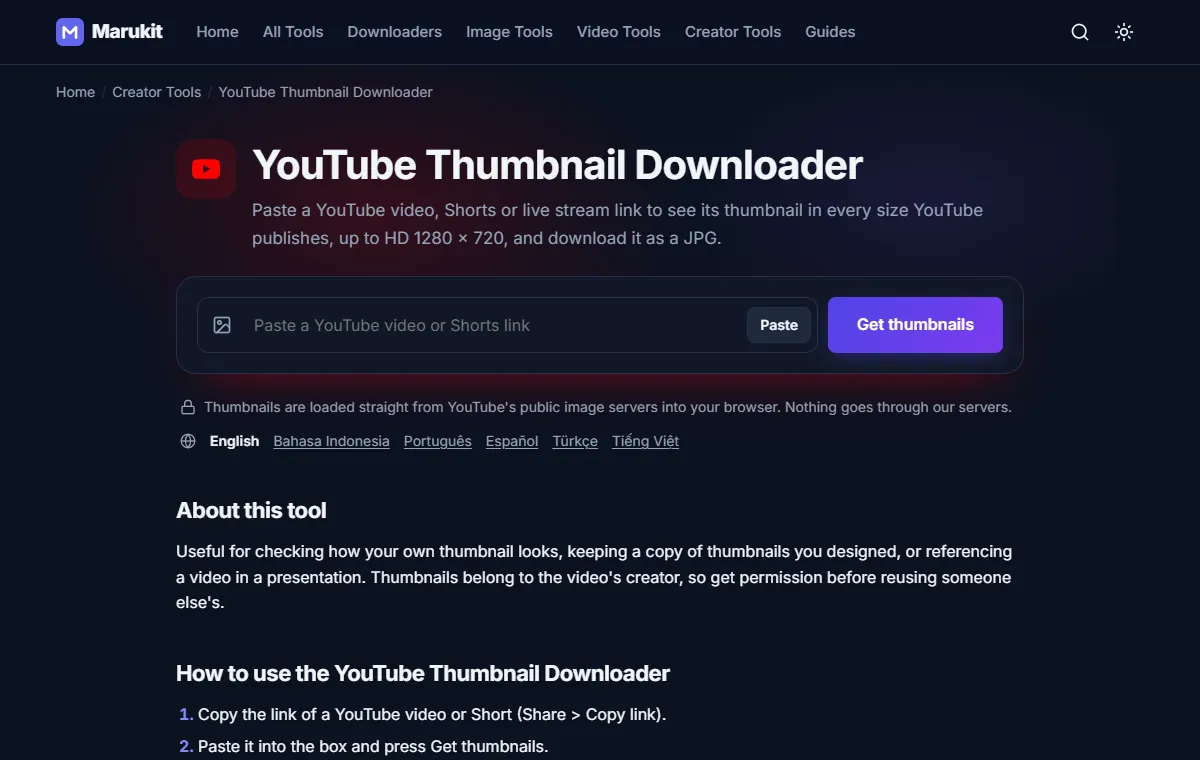
- Open the YouTube Thumbnail Downloader.
- Tap Paste. If your browser asks for permission to read the clipboard, allow it. Or tap the box and paste the link yourself; it starts automatically.
- If you typed the link instead, press Get thumbnails. A preview appears for each size YouTube has for that video.
Step 3: Pick a size and download
- HD thumbnail (1280 × 720) is the sharpest version, shown when the video has one.
- SD thumbnail (640 × 480) and High thumbnail (480 × 360) are smaller backups.
- Medium thumbnail (320 × 180) is a small preview size.
Each card shows the size in pixels and KB. Press Download under the one you want and you get a JPG. The images load straight from YouTube's public image servers into your browser. Marukit only saves thumbnails; it doesn't download YouTube videos or their sound.
Why some videos have no HD thumbnail
YouTube doesn't make a 1280 × 720 thumbnail for every video. Older uploads and low-resolution videos often only have the smaller sizes. The tool lists only sizes that really exist, so if HD is missing, the biggest card you see is the best available. The SD and High sizes are a squarer 4:3 shape, so a widescreen thumbnail can have black bars at the top and bottom.
Where the file goes on each device
- iPhone: Safari shows a download icon in the address bar. The file is in the Files app under Downloads. To move it to Photos, open it, tap Share, then Save Image.
- Android: open the Files or Downloads app. Most gallery apps also show it in a Downloads album.
- Windows or Mac: it's in your Downloads folder.
If it doesn't work
- "That doesn't look like a YouTube video link": the link is to a channel, playlist page or search, not a single video. Open the video itself and copy its link.
- "No thumbnails found. The video may be private or deleted.": there's no public thumbnail to get, so it can't be downloaded. Check the link opens the video in a private browser window.
- "Your browser blocked the Paste button": tap the box and paste the link yourself (long-press › Paste, or Ctrl+V).
- "Your clipboard is empty": copy the video link first, then press Paste again.
Resize, crop or shrink the thumbnail
Need a different size? Open the Image Resizer, untick Lock aspect ratio, type a width and height and choose Crop to fill. For example, 640 × 360 trims the black bars off an SD thumbnail without stretching it. To make the file smaller, use the Image Compressor.
Adding the thumbnail to a blog post? Convert it with Image to WebP first. The file is usually much smaller, so your page loads faster.
Try the YouTube Thumbnail DownloaderGet any YouTube video's thumbnail in HD and every size. Free, no signup.Open toolFrequently asked questions
How do I download the thumbnail from my own YouTube videos?
The same way: copy your video's link and paste it. You get the version YouTube shows viewers, which YouTube has compressed. If you still have the file you uploaded, that's the best quality copy.
Do I need an app or browser extension?
No. It works in Safari, Chrome or any modern browser on your phone or computer, with nothing to install and no account.
What is a YouTube thumbnail's image URL?
Thumbnails are stored at i.ytimg.com/vi/ followed by the video's ID and a size name: maxresdefault.jpg (HD), sddefault.jpg, hqdefault.jpg or mqdefault.jpg. The tool builds these links for you and shows only the ones that exist.
Tools in this guide
More guides
- How to Download TikTok Videos Without Watermark
- How to Download TikTok Audio as MP3 (iPhone, Android, PC)
- How to Download Facebook Videos (iPhone, Android, PC)
- How to Download Twitter (X) Videos on iPhone, Android and PC
- How to Download Pinterest Videos to Your Phone or PC
- How to Compress an Image to 100KB Without Losing Too Much Quality
- How to Compress a Video for WhatsApp
- HEIC vs JPG: Which Should You Use, and How to Convert
- Best Video Sizes for Social Media (TikTok, Reels, Shorts and More)
- How to Convert MOV to MP4 (Windows, Mac and iPhone)
- How to Convert PNG to WebP for a Faster Website
- How to Reduce Video Size on Your Phone (iPhone and Android)
- How to Make Your Photo Fit as a WhatsApp DP