 Marukit
Guide
How to Merge PDF Files into One (iPhone, Android, PC)
A job application, visa form or landlord asks for "one PDF", but you have a CV, a scan of your ID and two payslips as separate files. Here's how to combine them into a single PDF on any phone or computer, in the order you want, without uploading them anywhere.
Updated · 3 min read
Before you start
- Put the files in one place. On a phone, save email attachments to Files (iPhone) or Downloads (Android) first.
- Photos or scans as JPG? Turn them into a PDF first with JPG to PDF, then merge that PDF with the others.
- Password-protected PDFs can't be merged. If you're allowed to, save a copy without the password in your PDF app first.
Step 1: Choose your PDFs
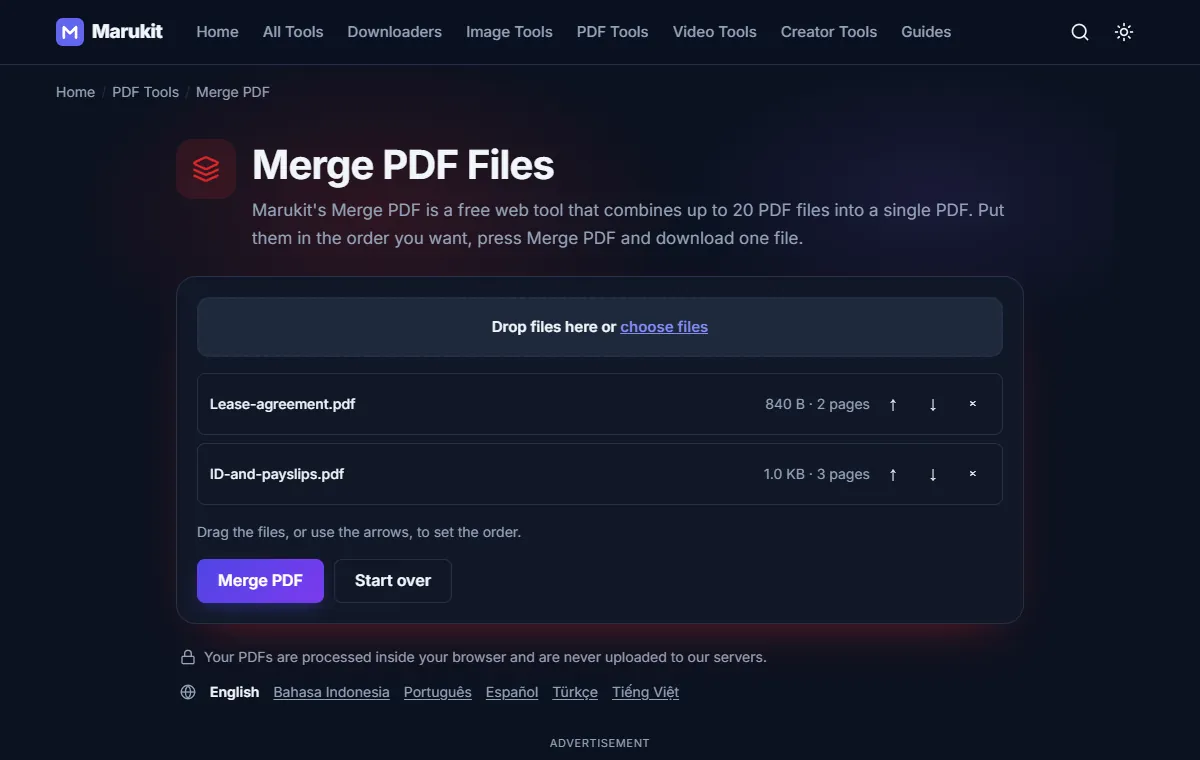
- Open Merge PDF.
- Tap choose files and select two or more PDFs (up to 20), or drag them onto the box on a computer. You can add more files later.
- Each file shows its size and number of pages, so you can check you picked the right ones.
Step 2: Set the order
The files are merged from top to bottom. Drag a file up or down, or use the ↑ and ↓ buttons. Remove a file with ×. The pages inside each file keep their own order; to move single pages around after merging, use Reorder PDF Pages.
Step 3: Merge and download
Press Merge PDF. When it's done you see the total number of pages and the file size; press Download to save marukit-merged.pdf. Pages are copied as they are, so text stays sharp and selectable and nothing is re-compressed.
The merging happens inside your browser. Your PDFs are never uploaded to our servers, which matters for IDs, payslips and contracts.
Merge PDFs on iPhone
- In the browser: open Merge PDF in Safari, tap choose files, then Browse to pick the PDFs from the Files app. The merged PDF saves to Files › Downloads.
- With the Files app: tap Select, pick the PDFs, tap More (…) and then Create PDF. Open the new PDF and check the page order; if it's wrong, use the browser method above, where you set the order yourself.
Merge PDFs on Android
Open Merge PDF in Chrome, tap choose files and pick the PDFs from Files or Downloads. If your phone opens the gallery, switch to Browse or Files to see PDFs. The merged file saves to your Downloads folder.
Merge PDFs on Windows or Mac
- Windows has no built-in way to merge PDFs. Use Merge PDF in any browser: select several files at once with Ctrl-click, or drag them from File Explorer onto the box.
- Mac: the browser works the same way. You can also open the first PDF in Preview, show View › Thumbnails, and drag the other PDFs into the sidebar.
If it doesn't work
- "Choose at least two PDFs to merge": add one more file. To combine images, use JPG to PDF instead.
- "This PDF is password-protected (encrypted)": the tool can't open it and doesn't remove passwords. Save an unprotected copy in your PDF app if you're allowed to.
- "This PDF couldn't be read. It may be damaged": the file is broken or only partly downloaded. Download it again.
- "Too big": each PDF can be up to 100 MB. On a phone, very large files can make the page stop responding; try on a computer.
- Bookmarks or form fields are missing: they aren't kept when merging. The visible pages are all there.
The upload form wants a smaller file or fewer pages? Use Split PDF to keep only the pages you need, or Delete PDF Pages to drop blank ones.
Try the Merge PDFCombine several PDF files into one, in the order you choose. Free, no signup.Open toolFrequently asked questions
Is it safe to merge PDFs with personal documents?
Marukit's Merge PDF works inside your browser, so the files never leave your device. That's why it's a good fit for IDs, payslips and contracts.
How many PDFs can I merge at once?
Up to 20 files, each up to 100 MB. To merge more, merge the first 20, then merge the result with the rest.
Does merging reduce the quality?
No. Pages are copied exactly, without turning them into images or compressing them again, so text stays sharp and selectable.
Tools in this guide
More guides
- Photo and Signature Size Limits for Online Applications
- How to Download TikTok Videos Without Watermark
- How to Download TikTok Audio as MP3 (iPhone, Android, PC)
- How to Download Facebook Videos (iPhone, Android, PC)
- How to Download Twitter (X) Videos on iPhone, Android and PC
- How to Download Pinterest Videos to Your Phone or PC
- How to Download YouTube Videos and Shorts as MP4
- How to Reduce Photo Size to 100KB on Phone or PC
- How to Compress a Video for WhatsApp
- HEIC vs JPG: Which Should You Use, and How to Convert
- Best Video Sizes for Social Media (TikTok, Reels, Shorts and More)
- How to Convert MOV to MP4 on Mac, Windows and iPhone
- How to Convert PNG to WebP for a Faster Website
- How to Reduce Video Size on Your Phone (iPhone and Android)
- How to Make Your Photo Fit as a WhatsApp DP
- How to Download a YouTube Thumbnail in HD (iPhone, Android, PC)