 Marukit
Guide
How to Extract Audio from a Video as MP3
Want just the sound of a video: a lecture, an interview, a voice note or a song you recorded? Here's how to save the audio from a video file as an MP3 on your phone or computer, which quality to pick, and how to get the MP3 straight from a TikTok, Facebook or X link.
Updated · 3 min read
Why convert a video to MP3?
- Smaller files: a 192 kbps MP3 is about 1.4 MB per minute, much less than the same minute of video.
- Plays anywhere: MP3 works in every music app, car stereo and phone, and you can listen with the screen off.
- Audio-only jobs: transcribing an interview, keeping a talk or class to listen to again, or sharing a voice recording.
Only convert videos you own or have permission to use.
How to extract audio from a video file
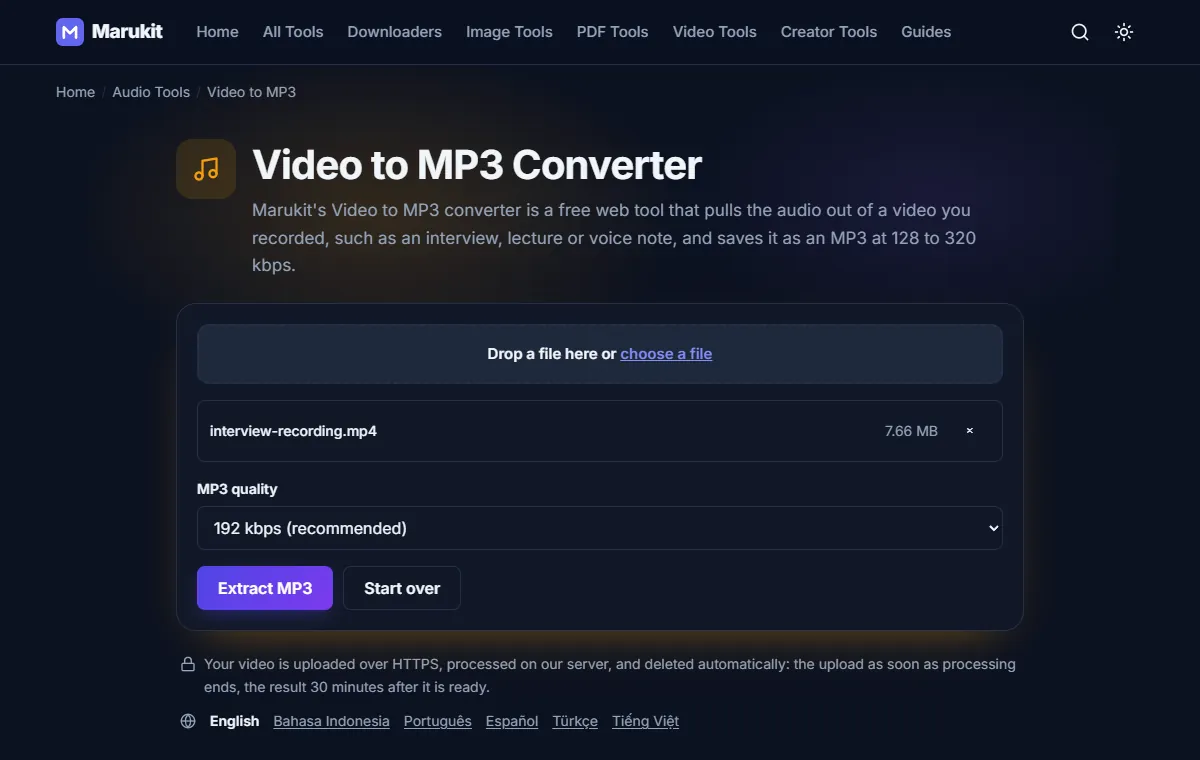
- Open Video to MP3. There's no app and no sign-up.
- Tap choose a file. MP4, MOV, WebM, MKV, AVI and M4V work, up to 95 MB and 20 minutes long.
- Pick the MP3 quality (see below). 192 kbps is the default.
- Press Extract MP3. You'll see the upload, then Extracting audio... with a percentage.
- Play the preview to check it, then tap Download. The file is named after your video, ending in -audio.mp3.
Unlike the image tools, this one sends the video to our server, where it's converted. The upload is deleted as soon as the MP3 is ready, and the MP3 30 minutes later. Camera details, location and other metadata are left out of the MP3.
Which MP3 quality should you choose?
- 128 kbps (speech): lectures, meetings, interviews and voice notes. About 1 MB per minute.
- 192 kbps (recommended): a good choice for most videos. About 1.4 MB per minute.
- 256 kbps: music, when you want a little more.
- 320 kbps (music): the highest MP3 quality, for songs. About 2.4 MB per minute.
A higher bitrate makes a bigger file, but it can't sound better than the audio already in the video. If the video was recorded on a phone's microphone, 192 kbps is plenty.
Extract audio from a video on iPhone or Android
- Open Video to MP3 in Safari or Chrome.
- Tap choose a file and pick the video from Photos (iPhone) or your Gallery or Files (Android). iPhone MOV videos work as they are.
- Press Extract MP3 and keep the page open until the preview appears.
- Tap Download. On iPhone the MP3 goes to the Files app under Downloads (Photos doesn't hold audio). On Android it's in Downloads.
Get the MP3 from a link instead
If the video is on TikTok, Facebook or X, you don't need to download the video first. Paste its link into one of these, and MP3 (audio only) is already at the top of the list:
- TikTok to MP3: sounds, songs and voice-overs from public TikToks (see how to download TikTok audio as MP3).
- Facebook to MP3: public Facebook videos, Reels and ended live streams.
- X (Twitter) to MP3: the first video in a public post.
These link tools save a 192 kbps MP3. YouTube links can't be converted to MP3 on Marukit: the YouTube downloader saves MP4 video only.
If the MP3 doesn't come out right
- "This video has no audio track, so there's nothing to convert to MP3." The file has no sound to save, for example a screen recording made with the microphone off.
- The MP3 is silent or in the wrong language. Some videos (often MKV files) have several audio tracks, and only the first one is used.
- The file is too big. The limit is 95 MB. Trim the video to the part you need on your phone, or shrink it first with Video Compressor.
- "This video is too long. The limit is 20 minutes." Trim the video into parts of up to 20 minutes and convert each one.
- "You already have 2 files processing." Wait for one to finish, then start the next.
Frequently asked questions
Is Video to MP3 free?
Yes. There's no sign-up and no account. You can convert up to two videos at a time; if you upload many in a short time, you're asked to wait a few minutes.
Can I convert MP4 to MP3 on a PC or Mac?
Yes. Open Video to MP3 in any browser, choose the MP4 and press Extract MP3. The MP3 goes to your Downloads folder.
Can I extract audio from a YouTube video?
No. Marukit doesn't save YouTube audio as MP3. The YouTube Video Downloader saves videos as MP4 only.
Does a 320 kbps MP3 sound better than 192 kbps?
Only if the video's own audio is good enough. For speech and phone recordings you won't hear a difference, and the file is bigger.
Tools in this guide
More guides
- Photo and Signature Size Limits for Online Applications
- How to Download TikTok Videos Without Watermark
- How to Download TikTok Audio as MP3 (iPhone, Android, PC)
- How to Download Facebook Videos (iPhone, Android, PC)
- How to Download Twitter (X) Videos on iPhone, Android and PC
- How to Download Pinterest Videos to Your Phone or PC
- How to Download YouTube Videos and Shorts as MP4
- How to Reduce Photo Size to 100KB on Phone or PC
- How to Compress a Video for WhatsApp
- HEIC vs JPG: Which Should You Use, and How to Convert
- Best Video Sizes for Social Media (TikTok, Reels, Shorts and More)
- How to Convert MOV to MP4 on Mac, Windows and iPhone
- How to Convert PNG to WebP for a Faster Website
- How to Reduce Video Size on Your Phone (iPhone and Android)
- How to Make Your Photo Fit as a WhatsApp DP
- How to Download a YouTube Thumbnail in HD (iPhone, Android, PC)
- How to Merge PDF Files into One (iPhone, Android, PC)
- How to Reduce Photo Size to 200KB for Online Forms