 Marukit
Guide
How to Reduce Photo Size to 200KB for Online Forms
A 200 KB limit gives you twice the room of a 100 KB one, enough for a sharp photo or a readable document scan. Here's how to get a photo under 200 KB without wasting that room, including forms that also set a minimum size or exact pixels, and how to do several photos at once.
Updated · 4 min read
When you need a photo under 200 KB
A 200 KB limit usually means the form wants more than a tiny face photo. You'll often see it for:
- Scanned documents such as certificates, mark sheets, ID cards or a page of a passport, where small text has to stay readable.
- Larger photos, like a full passport-style photo or a photo of you holding a document.
- Several uploads in one application, where each file has its own 200 KB limit.
Because 200 KB holds about twice as many bytes as 100 KB, you can keep more pixels or a higher quality. Don't shrink a photo to 50 KB when the form accepts 200 KB: use the room you have, and the officer reading your scan will thank you.
Reduce a photo to less than 200 KB in four steps
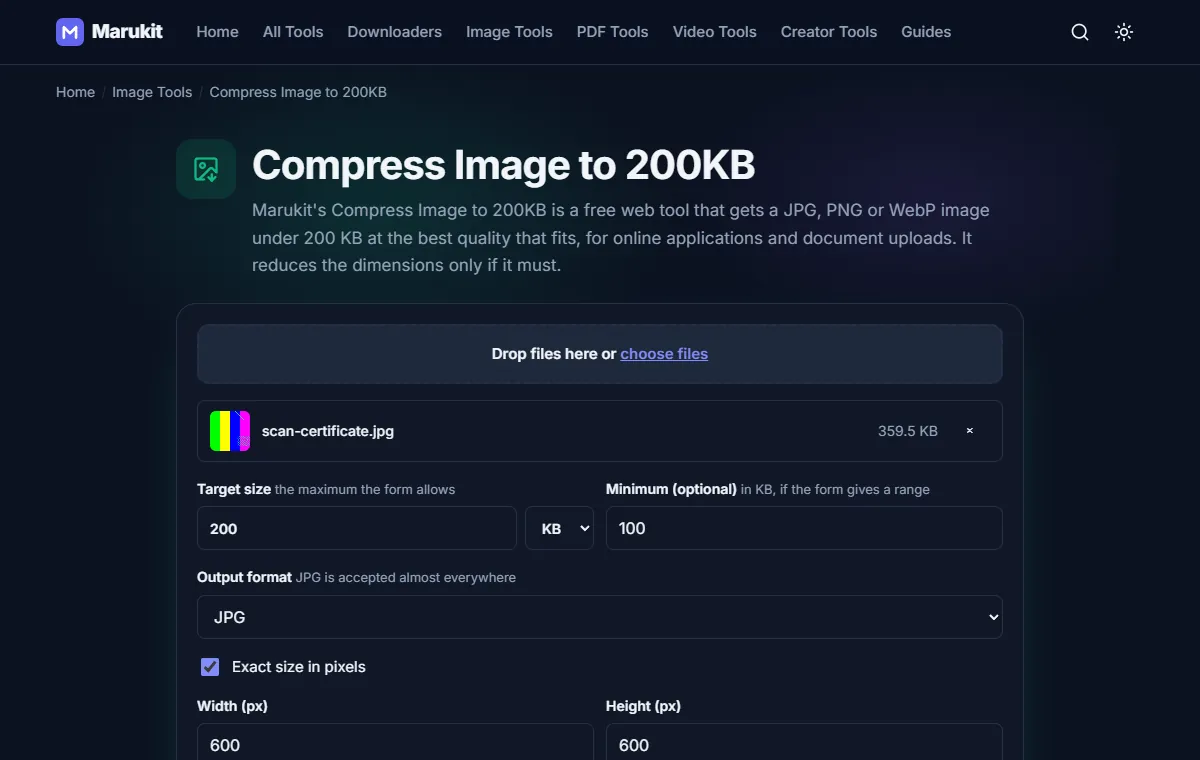
- Open Compress Image to 200KB. It works in Chrome, Safari and other browsers on phones and computers, with no app or sign-up.
- Choose your photo. JPG, PNG and WebP work, up to 50 MB. The photo stays on your device; nothing is uploaded.
- Keep JPG as the format (almost every form accepts it) and leave Reduce dimensions if needed on.
- Press Compress to 200 KB, check the size and the before/after view, then tap Download.
The tool tries quality levels to find the highest one that still fits, and only makes the photo smaller in pixels if quality alone isn't enough. If your photo is already under 200 KB, you get it back as it is.
iPhone photos in HEIC format? Turn them into JPG first with HEIC to JPG, then compress the JPG.
When the form gives a range, like 100 to 200 KB
Some forms reject files that are too small as well as too big. Type the lower number in Minimum (optional). The tool still aims for the best quality under 200 KB, and if even its highest quality comes out below your minimum, it tells you, so you know to use a larger or sharper original instead of finding out when the form rejects it.
When the form needs exact pixels
If the notice says something like "600 × 600 pixels", tick Exact size in pixels and enter the width and height. The photo is cropped from the centre to that shape (nothing is stretched) and then compressed to fit under 200 KB. Small pixel sizes are easy to get under 200 KB; if a large one can't fit, you'll see the closest size and a hint to try a smaller pixel size if the form allows it.
For a signature, tick Signature: clean white background, black and white. It makes the paper pure white, and with exact pixels the signature is fitted on white instead of cropped, so no stroke is cut off.
Reduce 20 photos to 200 KB at once
Have a stack of scans? Choose up to 20 images together. Each one is compressed with the same target and settings, and you can download them one by one or all together with Download all (ZIP). Each file keeps its own name with -200kb added, so you can tell them apart.
200 KB or 200 KiB: why results stay under 200,000 bytes
Some websites count 1 KB as 1,000 bytes, so their 200 KB limit is 200,000 bytes. Others count 1 KB as 1,024 bytes, which makes it 204,800 bytes. Marukit always aims just under 200,000 bytes, so the file passes either way. The result shows both numbers: the size in KB counted in 1,024s (so about 195 KB) and the exact byte count, just under 200,000. Windows also counts in 1,024s, so it shows a number a little under 200 KB as well.
If a form still says the file is too big, type 190 in the target box and compress again to leave a little room.
Need it as a PDF under 200 KB?
If the form asks for a PDF, compress the photo first, then turn it into a PDF with JPG to PDF. The PDF comes out a little bigger than the photo inside it, so compress to about 190 KB first. Marukit has no tool for shrinking an existing PDF.
Need a smaller limit?
For 100 KB use Compress Image to 100KB and see how to reduce photo size to 100KB. For the exact rules of common exam and job portals, see photo and signature size limits.
Try the Compress Image to 200KBHit a 200 KB limit while keeping as much quality as possible. Free, no signup.Open toolFrequently asked questions
How do I reduce a photo to 200 KB on iPhone?
Open Compress Image to 200KB in Safari, choose the photo from your Photo Library and press Compress. The file goes to Files › Downloads; open it and tap Share › Save Image to put it in Photos.
Can I compress a photo to 200 KB without losing quality?
A smaller file always holds less detail, but at 200 KB the difference is usually hard to see. The tool keeps the highest quality that fits and only reduces pixels when it must.
Is my photo uploaded anywhere?
No. Compression runs in your browser, so the photo never leaves your device.
Can I reduce a passport photo to 200 KB?
Yes. If the form gives exact pixels, tick Exact size in pixels and enter them. Check your own notice for the background and size rules.
Tools in this guide
More guides
- Photo and Signature Size Limits for Online Applications
- How to Download TikTok Videos Without Watermark
- How to Download TikTok Audio as MP3 (iPhone, Android, PC)
- How to Download Facebook Videos (iPhone, Android, PC)
- How to Download Twitter (X) Videos on iPhone, Android and PC
- How to Download Pinterest Videos to Your Phone or PC
- How to Download YouTube Videos and Shorts as MP4
- How to Reduce Photo Size to 100KB on Phone or PC
- How to Compress a Video for WhatsApp
- HEIC vs JPG: Which Should You Use, and How to Convert
- Best Video Sizes for Social Media (TikTok, Reels, Shorts and More)
- How to Convert MOV to MP4 on Mac, Windows and iPhone
- How to Convert PNG to WebP for a Faster Website
- How to Reduce Video Size on Your Phone (iPhone and Android)
- How to Make Your Photo Fit as a WhatsApp DP
- How to Download a YouTube Thumbnail in HD (iPhone, Android, PC)
- How to Merge PDF Files into One (iPhone, Android, PC)
- How to Extract Audio from a Video as MP3